


Zoom is approved for use by Cetera. It is a cloud-based video communications platform that allows for virtual video, audio conferencing and screen-sharing meetings with clients.
However, many of the features available in Zoom are NOT permitted by Cetera.
Click HERE for Cetera’s Zoom Compliance Guidelines document.
You can also find guidance on Zoom, and any other approved vendor, by going to Adviceworks - Support - Solutions, Services, and Discounts.
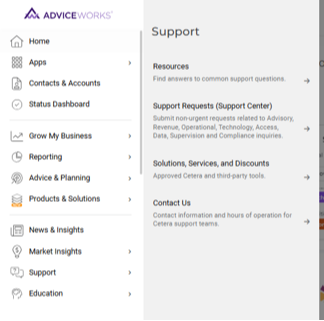
Once you are on the Solutions, Services, and Discounts page, you will see a list of all approved vendors with Cetera Advisors. You can filter, sort, or search for the options to find the vendor you are looking for. If the vendor is not on the list, it is not approved for use by Cetera.
Search or scroll down to find Zoom. Click in the white space below the vendor’s name.
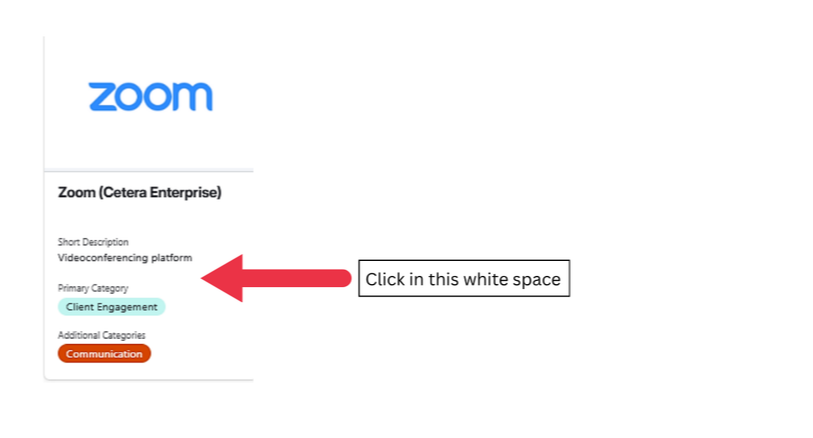
Another window will pop up with additional detailed information. The information that pops up lists the approved functionality as well as the features that are not approved.
Zoom features that are APPROVED:
- Meeting
- Webinar
- Team Chat- only if you subscribe to the Cetera Enterprise version.
- Zoom Rooms- additional license required.
- Zoom Phone- only if you subscribe to the Cetera Enterprise version.
Zoom features that are NOT approved:
- In-Meeting/In-Webinar Chat
- AI Companion/ AI Notetaking
- Appointment Scheduler
- Document Generation
- SMS Texting
- Workflows
- Tasks
- Whiteboard
- Notes
- Knowledge Base
- Clips
- Livestreaming
- Simulive Webinars
- Cloud Recording/Sharing
- Events/Sessions
- Zoom Hub
- Team Chat without using the Cetera Enterprise version of Zoom
- Zoom Phone without using the Cetera Enterprise version of Zoom
** Please note this information is subject to change. **
Please reach out to the Prosperity Network Compliance Team with any questions: 913-529-5500 or compliance@prosperityadvisors.com.
Internal Use Only