


Advisors should regularly review the Advisory Surveillance Dashboard in Pinpoint to review advisory accounts that have Warnings or Violations regarding Concentration, Risk Variance, or Low Volume Trading. If an acceptable rationale is not submitted in Pinpoint and/or no corrective action is taken during the stated violation period, advisory fees will be turned off on the account or position, as applicable.
You can identify all accounts that have advisory fees turned off by filtering for “Resolved-Fees Off” in the Advisory Surveillance Dashboard. You can also request a full list of accounts with billing exclusions or fee exclusions from Advisory Billing and Reporting at advisoryservices@cetera.com.
If Advisory fees have been turned off on the client’s account or position due to a violation, you can request billing be reinstated once the violation has been resolved. NOTE: Advisory billing does not automatically restart, you must contact the Prosperity Network OSJ to request the advisory billing be reinstated. We will contact Advisory Compliance at advisorycompliance@cetera.com to request billing be reinstated.
Click here to watch Cetera Advisors’ Training Videos:
- Advisory Surveillance for Advisors: https://ceteracos.pinpointglobal.com/Portal/resource/docs/ppg-compliance-advisory-surveillance-for-advisors.mp4?preview=True
- Low Volume Trading for Advisors: https://ceteracos.pinpointglobal.com/Portal/resource/docs/ppg-compliance-low-volume-trading.mp4?preview=True
Click here for helpful resources:
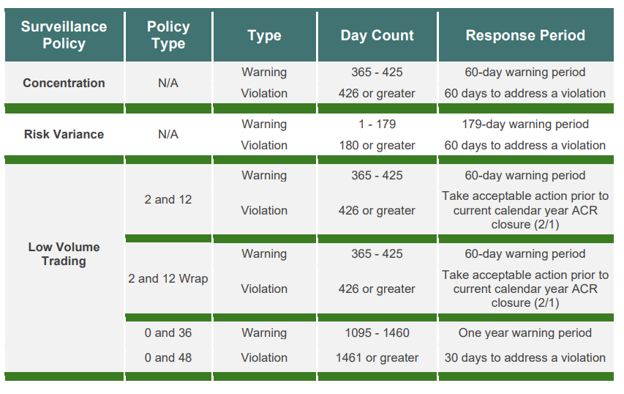
Advisory Surveillance Alert Timeline:
Tips and Guidance:
- Accounts in Warning status do not require any immediate action. Review the accounts in Warning status to proactively address items before they turn into a Violation.
- Accounts in Violation status require action that depends on the type of Violation. If the Violation is not resolved in the time allowed, advisory billing may be turned off for the account or position.
Concentration Violations: An advisory account with a 30% or more concentration in a single security or in cash for more than 425 days will be in Violation status. If the violation is not resolved within 60 days, the advisory billing will be turned off on the concentrated position.
- Resolution option: If it is in the client’s best interest and is suitable, you can place trades to reduce the concentration. A trade action will flow into the Pinpoint system within approximately 48 hours, and the alert will automatically be closed and archived.
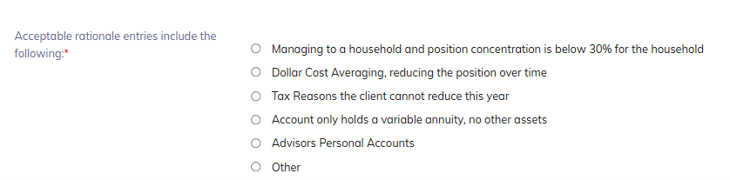
- Resolution option: If applicable, you can submit a rationale in Pinpoint to confirm the client has additional household accounts that reduce the overall concentration. You need to consider if the household accounts also hold the position that is concentrated. TIP: In the Pinpoint submission, select “Managing to a household and position concentration is below 30% for the household.” Do NOT click “Other”. In the comments section, you must list the total amount of assets held in other investment accounts and the total amount invested in the concentration position held in all accounts. Provide the total concentration percentage in the comments.
- Resolution option: If applicable, submit a rationale in Pinpoint selecting one of the other listed acceptable rationales: Dollar Cost Averaging, Tax Reasons (for Non-Qualified accounts only), Account only holds a variable annuity, or Advisors Personal Accounts. Do NOT use the “Other” option if the reason is listed as an Acceptable rationale.
- Resolution Option: If the reason for the concentration is not listed as an option in the submission form, then you can select “Other” and provide the detailed explanation. If you select “Other” and the rationale was available to be selected from a list, Advisory Compliance will return the submission to you for correction.
Risk Variance Violations: An advisory account that has drifted away from the client’s documented suitability range on the SIS or IPS for 180 days or more will be in a Violation status. You must address the Violation within Pinpoint within 60 days, or the advisory fees will be turned off on the entire account.
- Resolution option: If the account is rebalanced to the client’s stated risk, the alert will resolve in Pinpoint within 48 hours.
- Resolution option: If the client has a new risk level, an updated SIS and AIF/CAF can be submitted. The SIS and the AIF/CAF must align with each other. If the SIS is updated in line with the current account allocation, the alert will resolve in Pinpoint within 48 hours.
Low Volume Trading Violations: An advisory account that has not had at least 3 trades in 12 consecutive months (365 days) will be in Warning status for 60 days. The account will be in Violation status from Day Count of 426 or greater. You can place appropriate trades during the warning or violation period to automatically close out the violation. You can submit a current year Annual Client Review (ACR) in Pinpoint describing why the account is still suitable to remain an advisory account and why the account is not actively trading.
- Advisory non-wrap accounts: A “2 and 12” alert means a non-wrap advisory account has violated the low volume trading policy. You can rebalance or submit a current calendar year ACR to close out the alert.
- Advisor Directed Wrap Accounts: A “2 and 12 Wrap” alert means Advisor directed wrap program accounts were flagged for low volume trading and will have client disclosure letters mailed annually. Review the warning alerts in the Pinpoint Advisory Surveillance Dashboard to identify if any clients will be receiving the client disclosure letter. This allows time for you to discuss with the client if a rebalance or other action, such as a move to a different account program/type is appropriate. Submitting a current calendar year ACR will close the alert but will not prevent the client disclosure letter from being sent out.
Accounts without a trade for over 3 years: An “LVT 0/36” alert means a trade has not occurred in the account for over 3 years.
- No trades in years 3-4 will be in Warning status. During this time, you should review the account to determine if a rebalance or other action is appropriate.
- If the account reaches 4 years with zero trades, it moves to Violation status, and you have 30 days to provide an acceptable rationale/action.
Please contact the Prosperity Network OSJ compliance team with any questions: compliance@prosperityadvisors.comor 913-529-5500 Option 2. Alternatively, you can contact Advisory Compliance at AdvisoryCompliance@Cetera.com or open a Salesforce case in the Support Center.
Internal Use Only